
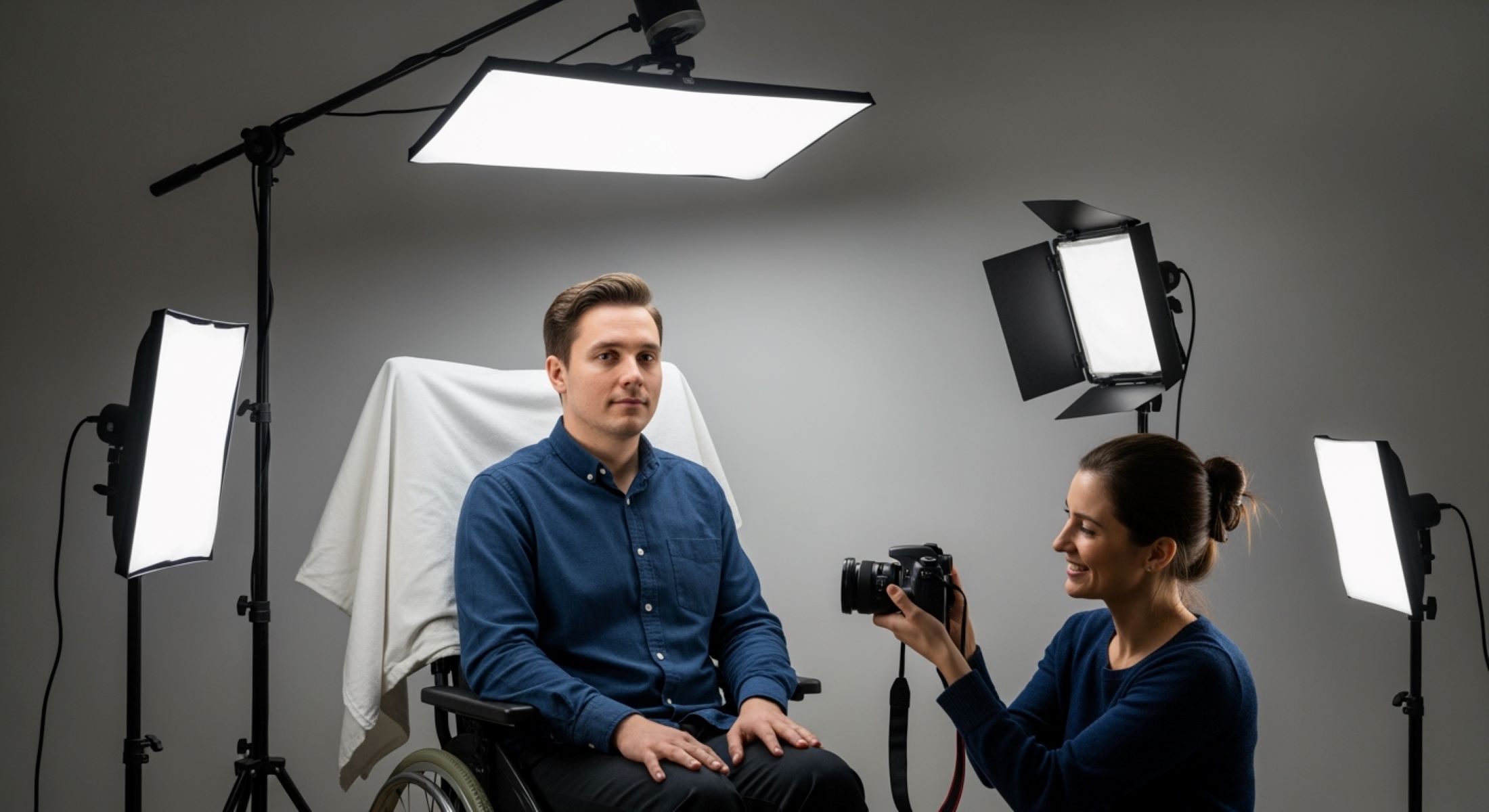
Taking a passport photo might seem simple for most people, but when someone has limited mobility, it can become a challenge. Whether it’s due to age, injury, or disability, the standard passport photo requirements don’t always consider accessibility. But don’t worry — with a little planning and the right techniques, helping someone with limited mobility get a passport photo can be smooth, stress-free, and even kind of fun. Let’s dive in.
Understanding Passport Photo Requirements
Before taking a passport photo, it’s essential to understand that these photos are not casual snapshots — they have very specific standards that must be followed. Unlike selfies or casual photos, passport pictures are used for identification, so any deviation from the rules can result in rejection. This means that even small details, such as the angle of the head, the lighting, or the background, must meet strict criteria. Taking the time to understand these rules beforehand can save both time and frustration, especially for someone with limited mobility who may find repeated attempts physically challenging. Planning ahead ensures that the process is smooth and stress-free for both the person being photographed and the caregiver helping them.
One of the most critical aspects of a passport photo is its size and composition. Most countries require a standard 2 x 2 inches (51 x 51 mm) photo, and the head must occupy a certain portion of the frame. The face should be fully visible from the bottom of the chin to the top of the head, with shoulders squared to the camera. The positioning must be precise — the head must be centered, and the person must look directly into the camera lens. Even slight tilts or off-center positioning can cause the photo to be rejected. Understanding these composition requirements helps in arranging the person’s seating or standing position correctly, which is particularly important for individuals with mobility limitations.
Another key requirement is the background and lighting. Passport photos require a plain, light-colored background, typically white or off-white, without patterns, shadows, or objects. Uneven lighting or shadows on the face or background can interfere with facial recognition and result in a rejected photo. This is why it’s important to choose a well-lit area, preferably with natural light, and to avoid bright sunlight or harsh artificial lighting that can create unflattering shadows. Using simple lighting tools, such as a desk lamp or reflector, can help ensure the person’s face is evenly illuminated and the background remains neutral and distraction-free.
Finally, the facial expression and eye visibility are vital for compliance. Passport photos require a neutral expression — no smiling, frowning, or exaggerated expressions. The eyes must be fully open and clearly visible, with glasses generally removed to avoid reflections. Even minor changes in expression or eye closure can lead to rejection. For someone with limited mobility, maintaining a neutral expression while staying comfortable may require breaks or adjustments in seating height. By understanding these detailed requirements, caregivers can prepare a controlled, accessible environment that makes taking a passport photo efficient, comfortable, and successful on the first attempt.
Challenges Faced by People with Limited Mobility
- Difficulty standing for long periods, which can lead to fatigue or discomfort.
- Trouble maintaining proper head position or posture, making it harder to meet passport photo requirements.
- Fatigue when holding a posture, especially if multiple attempts are needed to get the perfect shot.
- Limited balance or stability, increasing the risk of falls when standing.
- Difficulty moving to the correct distance from the camera or adjusting positioning independently.
- Inability to reach or operate standard photo booth controls or automated camera systems.
- Standard photo booths often being inaccessible for wheelchairs or mobility aids.
- High counters or fixed tripod heights that are difficult to adjust for seated positions.
- Equipment such as cameras, tripods, and lighting may require constant manual adjustment, which can be challenging.
- Frustration caused by repeated attempts if the photo doesn’t meet official specifications.
- Anxiety or stress about meeting strict passport photo rules.
- Limited patience due to physical discomfort, making the process emotionally taxing.
- Difficulty following instructions if bending, turning, or repositioning is required repeatedly.
- Challenges in coordinating movements with a caregiver while staying aligned with the camera.
- Potential self-consciousness or embarrassment during the photo-taking process, especially if help is needed.
- Extra time needed to prepare, adjust, and reattempt photos, which can be exhausting for both the person and the helper.
Prepare the Environment
| Aspect | Recommendation | Reason | Practical Tip | Notes for Limited Mobility |
| Lighting | Use natural daylight whenever possible | Provides soft, even light and reduces shadows | Position near a window or well-lit room | Avoid harsh sunlight that causes squinting |
| Background | Plain, light-colored wall or solid sheet | Meets passport requirements and avoids distractions | Use a white or off-white sheet if wall isn’t suitable | Ensure background is wrinkle-free |
| Space | Ensure ample room for wheelchair or mobility aid | Allows freedom of movement and safety | Move furniture and clear the floor | Keep pathways unobstructed for safety |
| Surface | Level, stable flooring | Prevents tipping or instability | Remove rugs or uneven mats | Critical for wheelchair users or anyone needing support |
| Seating | Use a stable chair or wheelchair | Provides support if standing is difficult | Ensure chair height aligns with camera level | Add cushions for comfort and correct posture |
| Clutter | Remove objects and obstacles | Reduces risk of tripping and distractions | Clear nearby furniture, bags, or cords | Helps the person feel more secure |
Choose the Right Equipment
Selecting the right equipment is crucial for taking a successful passport photo, especially when working with someone with limited mobility. While you don’t need professional photography gear, using the right tools can make the process faster, safer, and more comfortable. The primary focus should be on stability, proper framing, and lighting rather than fancy features. A high-quality camera or smartphone is usually sufficient, but it should be capable of capturing clear, high-resolution images to meet passport requirements. Understanding the pros and cons of each option helps you plan efficiently and reduces the chances of needing repeated attempts, which can be tiring for the person being photographed.
When it comes to camera options, there are several practical choices. A modern smartphone with a high-resolution camera is often the most convenient, as it is easy to handle, can be mounted on a tripod, and allows for instant review of images. Digital cameras are another option, providing more control over exposure, focus, and image quality, which can be helpful when dealing with specific lighting conditions. There are also dedicated passport photo apps that guide you through framing, cropping, and sizing to ensure compliance with official requirements. However, it’s essential to make sure these apps follow your country’s official passport photo guidelines, as improper cropping or distortion can result in rejection.
Beyond the camera itself, support tools play a significant role in ensuring the process goes smoothly. Tripods are particularly useful, as they stabilize the camera and allow for consistent height and alignment, reducing the need for repeated adjustments. For someone with limited mobility, a chair or stool can be invaluable, providing comfort and helping maintain proper posture during the photo session. Adjustable lighting, such as lamps or portable ring lights, is also crucial to eliminate shadows and create a clear, evenly lit image. These tools help achieve a professional-quality photo without causing strain or fatigue.
Lastly, considering the accessibility of the equipment is just as important as its functionality. The camera should be positioned at eye level with the person being photographed to ensure proper framing, whether they are seated or standing. All support tools, like tripods or lighting equipment, should be easy to adjust so that caregivers can make quick changes without disturbing the person’s comfort. Proper setup of the equipment minimizes repeated movements, reduces physical strain, and ensures that the final photo meets official standards while keeping the person’s experience as stress-free and comfortable as possible.
Positioning the Person Correctly
- Ensure the head and shoulders are fully visible and centered in the frame.
- Determine whether the person will be seated or standing based on mobility and comfort.
- For seated positioning, choose a chair or wheelchair that doesn’t block the shoulders or head.
- Make sure the seating surface is stable to prevent tipping or wobbling.
- Position the person so their eyes are at the same level as the camera lens.
- Maintain a neutral chin position — not tilted up or down — to meet passport photo guidelines.
- Keep shoulders relaxed and squared to the camera to create a natural posture.
- For standing, provide sturdy support, such as a wall, grab bar, or stable chair nearby.
- Allow sufficient space around the person to maneuver mobility aids safely.
- Ensure the person is comfortable and can maintain posture without strain or fatigue.
- Adjust the height of the camera or tripod to align perfectly with eye level.
- Use cushions or supports if needed to achieve correct head height and posture.
- Verify that the person’s back is straight, avoiding leaning or slouching.
- Encourage small breaks if the posture is difficult to maintain for long periods.
- Check the alignment from different angles to make sure the head and shoulders remain centered.
- Keep arms and hands relaxed at the sides or resting naturally on the chair.
- Minimize movement by having the person remain in position until multiple shots are taken.
- Ensure any mobility aids or chair parts do not obstruct the view of the head and shoulders.
- Consider using a helper or caregiver to make subtle adjustments safely without causing discomfort.
- Maintain a calm, patient approach to reduce anxiety and help the person feel confident during positioning.
Adjusting the Camera Angle
| Aspect | Recommendation | Reason | Practical Tip | Notes for Limited Mobility |
| Camera Height | Position camera at eye level | Ensures proper alignment of head and shoulders | Use a tripod or stackable surface to adjust height | Adjust based on seated or standing position |
| Distance | Maintain 4–6 feet from the person | Prevents facial distortion and ensures proper framing | Use measuring tape or markers on the floor | Keep wheelchair or mobility aids in mind for distance |
| Stability | Use tripod, table, or stable surface | Reduces blur and maintains consistent framing | Ensure tripod legs are locked and level | Critical for multiple shots without moving the person |
| Angle | Keep camera straight-on, no tilt | Passport photos require direct, front-facing view | Check with a helper or reflection to confirm | Avoid shooting from above or below, especially for seated individuals |
| Shadows | Eliminate shadows from person or surroundings | Shadows can cause photo rejection | Use additional lighting or reposition person and equipment | Watch for shadows from wheelchairs, chairs, or other aids |
| Framing | Center the head and shoulders | Meets official passport requirements | Mark floor or camera alignment points | Ensure full head and shoulder visibility without obstruction |
| Lens Level | Align lens parallel to face | Prevents distortion or slanted images | Double-check tripod or table alignment | Adjust tripod or camera mount for slight height differences |
Managing Lighting
Lighting is one of the most critical factors when taking a passport photo, yet it is often overlooked. Even small variations in light can create shadows, distort facial features, or make the background appear uneven, which can result in the photo being rejected. Proper lighting ensures that the person’s face is clearly visible, well-defined, and meets official requirements. For someone with limited mobility, carefully managing lighting can reduce strain and make it easier to maintain posture without constantly adjusting for shadows or glare. Taking the time to set up lighting correctly before snapping the photo can save multiple attempts and unnecessary fatigue.
Natural light is generally the best option for passport photos. Position the person facing a window with indirect daylight to provide soft, even illumination. Avoid placing them in direct sunlight, as this can cause harsh shadows or make them squint, which is not acceptable for official photos. If natural light is limited or inconsistent, supplementary lighting can be used to maintain consistent results. Choosing the right location and time of day can make a significant difference, especially for those who may tire quickly or have difficulty holding a pose for long periods.
Soft, diffuse lighting is key to eliminating shadows on the face and background. This can be achieved by using lamps with soft shades, a ring light, or even a simple white sheet to diffuse sunlight from a window. Position lights at an angle that illuminates the face evenly without creating glare or hotspots. For people with limited mobility, this setup allows them to remain comfortably seated while the lighting provides full coverage, reducing the need for repeated adjustments and allowing them to maintain a natural posture and neutral expression.
Using simple lighting tools can make the process much easier and more effective. A ring light provides even illumination across the face, minimizing shadows and highlighting facial features. Desk lamps or small portable lights can be strategically placed to fill in any shadowed areas, especially around the chin and sides of the face. Reflectors, even simple white cardboard or foam board, can bounce light back onto the face, softening shadows and balancing the exposure. Combining these tools thoughtfully ensures that the photo is clear, meets official standards, and is captured efficiently without causing unnecessary strain on someone with limited mobility.